
Your website may already appear in Google for valuable searches, yet those impressions do not always turn into visits. Google Search Console Queries reveal the exact searches that bring your pages into results, helping you find missed opportunities. At Dune Seed, we use this kind of performance data to turn search visibility into practical improvements for content, titles, and website growth.
What Are Google Search Console Queries?
A query is the search phrase someone entered before Google displayed a result from your website. The Queries tab groups performance data by these phrases, so you can see which topics attract visibility, which generate clicks, and where your content may not fully match what searchers want.
Queries are not the same as a traditional keyword list. They reflect real search activity for your property, but the report does not show every search. Google omits some anonymized queries for privacy, and filtering can change totals because of data limits. Treat the table as a valuable sample, not a complete record of every search.
How to Find Search Queries in Google Search Console
Open Google Search Console and select the correct website property. Go to Performance → Search results, choose a useful date range, and enable Clicks, Impressions, Average CTR, and Average Position above the chart. The default report view covers the previous three months, but you can choose a longer or shorter period.
Scroll to the table and select Queries. Sort by Impressions to discover searches that show your site often, or by Clicks to find phrases already bringing visitors. Click an individual query, then open Pages to see which URLs Google displayed for that search. You can also add filters for page, country, device, or search type to make comparisons more meaningful.
Understand Impressions, Clicks, CTR, and Average Position
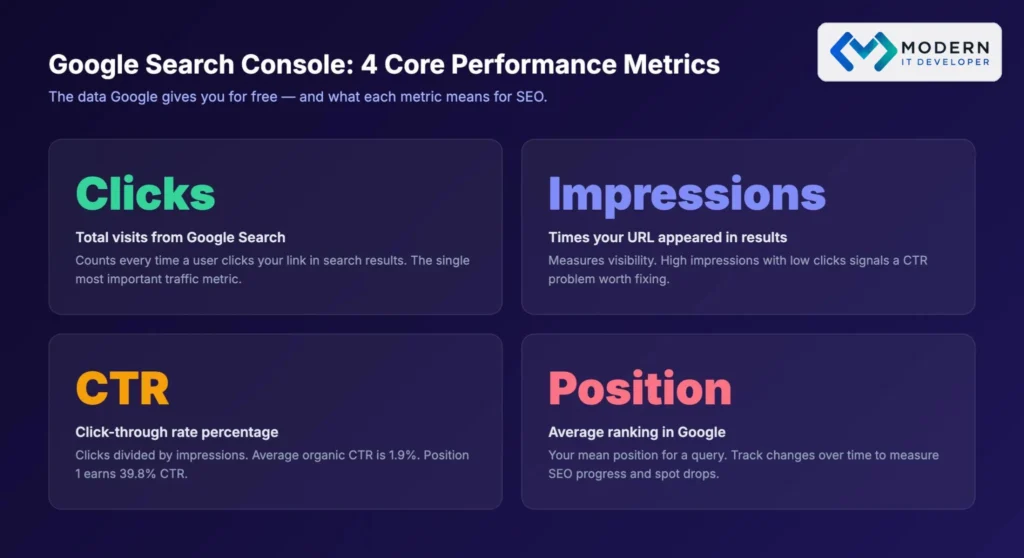
Before choosing what to optimize, understand what each metric tells you. Clicks count visits from Google results; impressions measure how often your site appeared; CTR is clicks divided by impressions; and average position represents the average position of your site’s topmost result. It is an average, not a fixed ranking that every searcher sees.
| Metric | What it tells you | What to investigate |
|---|---|---|
| Impressions | How often a result appeared | Search demand and visibility |
| Clicks | How many visits came from results | Traffic and relevance |
| CTR | Clicks divided by impressions | How compelling the result looks |
| Average Position | Average location of the top result | Ranking trends alongside clicks and impressions |
For example, 120 clicks from 6,000 impressions produce a 2% CTR. That number is not automatically good or bad. Compare similar queries, positions, devices, countries, and time periods before deciding whether a page underperforms.
Five SEO Opportunities Hidden in Query Data

1. High impressions and low CTR
A query with many impressions but few clicks may indicate that your result is visible but not persuasive or relevant enough. Review the page’s title link and snippet, then compare them with the wording and intent behind the query. A clearer title or a more useful description may help users understand why your page is worth visiting.
2. Queries ranking around positions 8–20
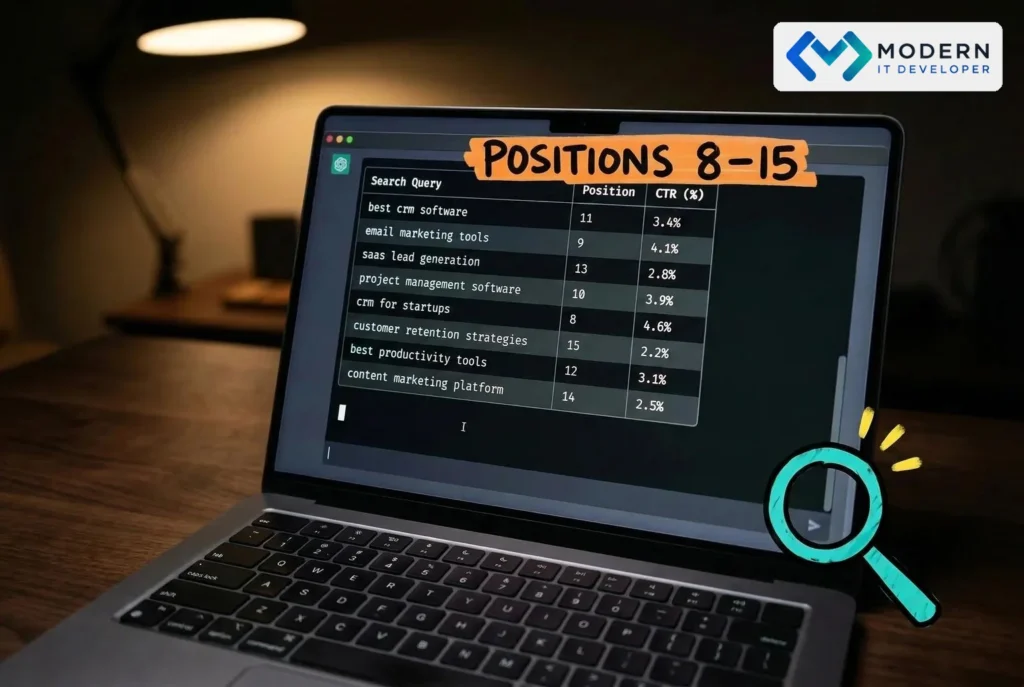
Treat positions 8–20 as a practical review range, not a Google ranking rule. These queries may indicate that Google already considers your page relevant, but the page could need stronger coverage, clearer answers, useful examples, or better internal links. Check the actual query and competing results before making changes.
3. Unexpected queries
Unexpected phrases can reveal questions or subtopics your content only partially addresses. If the query fits the page’s purpose, add a useful section that answers it directly. If it represents a different search intent, consider a separate page rather than forcing unrelated information into an existing article.
4. Queries that already generate clicks
Your successful queries show which topics attract the right audience. Check whether the relevant page is current, answers follow-up questions, and guides visitors toward a useful next step. You can strengthen these pages with relevant internal links and clearer calls to action without changing content that already performs well unnecessarily.
5. One query appearing for several URLs
Select the query and open the Pages tab to identify every URL Google has shown. Multiple URLs are not automatically a problem; they may answer different aspects of the same topic. Investigate further if pages have overlapping intent, alternate in visibility, or compete for the same audience. Then clarify each page’s purpose and improve internal linking.
How to Improve Organic CTR
Start with the searcher’s intent. A person looking for a comparison expects a comparison; someone searching for a tutorial expects clear steps. Write a concise, descriptive title that accurately reflects the page and makes its value clear. Avoid repeating keywords or promising something the content does not deliver. Google may generate title links from several page elements, so keep the title, main heading, and visible content consistent.

Next, write a useful meta description that summarizes the page and gives searchers a reason to choose it. Google may use the meta description, but it can also create a snippet from page content and show different text for different searches. Therefore, improve the opening sections of the page as well as its metadata.
Turn Query Data into an SEO Action Plan
Do not edit every low-CTR page at once. Build a short list of opportunities and prioritize them by business relevance, impressions, current position, and the quality of the page. Record the target query, URL, baseline clicks, impressions, CTR, and average position before making a change.

Make one focused improvement at a time where possible: refine a title, improve a description, answer a missing question, or strengthen internal links. After Google has recrawled the page, compare an equivalent period with the previous baseline. Segment by device or country if performance differs across audiences, and focus on meaningful trends rather than daily fluctuations.
Common Mistakes to Avoid
Do not treat average position as an exact rank, assume every query should have a high CTR, or judge a page using a tiny number of impressions. Search results vary by location, device, and context, while anonymized queries mean the visible query list is incomplete. Also avoid changing titles repeatedly without allowing enough time to measure the effect.
Most importantly, do not create a new article for every phrase in the report. Group related queries by search intent, then decide whether the best action is to improve an existing page, create genuinely new content, or leave the page unchanged.
Conclusion
Google Search Console Queries can reveal where your website earns visibility, where users choose another result, and which topics deserve more attention. Review the four performance metrics together, investigate the pages behind important queries, and make focused improvements based on search intent. A consistent review process turns Search Console from a reporting tool into a practical source of SEO growth.
Frequently Asked Questions About Google Search Console Queries
What are Google Search Console queries?
Google Search Console queries are the search phrases people entered
before Google showed a result from your website. The Queries report
connects those phrases with impressions, clicks, CTR, and average
position, helping you understand what people search for and how your
pages perform during the selected period.
How do I find keywords in Google Search Console?
Open your website property in Google Search Console and navigate to
Performance → Search results. Select the Queries tab beneath the
performance chart. You can sort the results by impressions, clicks,
or CTR to discover keywords that already generate visibility and
identify opportunities for further optimization.
What is a good CTR in Google Search Console?
There is no universal CTR benchmark for every website or keyword.
Click-through rates depend on average position, search intent,
competition, device, and search result features. Compare similar
queries and pages instead of judging your performance against a
single industry-wide percentage.
How can I find keywords my website almost ranks for?
Open the Queries report and look for relevant searches with
impressions but relatively low average positions. Positions around
8–20 can provide a useful starting point. Investigate the pages
ranking for those queries and improve their content, relevance,
internal links, and search presentation.
Does Google Search Console show all search queries?
No. Google may omit anonymized queries to protect user privacy.
The report can also have data limitations, especially when applying
certain filters. Therefore, the available query list should be
treated as a sample of search activity rather than a complete list
of every keyword bringing visibility to your website.
Can changing a page title improve organic CTR?
Yes. A more descriptive and relevant title can help users understand
why your page matches their search. However, changing a title does
not guarantee more clicks. Google can generate title links using
different page elements, and actual results depend on relevance,
competition, and search intent.
Does average position show my exact Google ranking?
No. Average position represents the average position of your site’s
topmost result across the recorded impressions. Rankings can vary
by location, device, and search context. Use average position to
identify trends and opportunities rather than treating it as a
fixed ranking for every search.