

Technical SEO problems are often difficult to spot by checking a website page by page. Dune Seed helps businesses uncover these hidden issues through structured SEO audits, and Screaming Frog SEO Spider is one of the most useful tools for that process. It crawls a website, collects technical data from each URL, and turns that information into an actionable audit.

What Is Screaming Frog SEO Spider?
Screaming Frog can identify broken links, redirects, missing metadata, duplicate pages, canonical problems, indexing directives, image issues, and many other technical signals. The official tool currently checks more than 300 SEO issues and allows free crawls of up to 500 URLs, making it useful for small websites and professional audits.
What Does Screaming Frog Do?
Screaming Frog examines website links and records data on each URL. Instead of manually opening many pages, you can review status codes, titles, meta descriptions, headings, canonicals, directives, links, images, structured data, and more from a single interface.
It is especially useful for diagnosing crawlability, indexation, user experience, and site architecture. It can also render JavaScript pages, compare crawls, create XML sitemaps, connect with analytics and search data, and export datasets.

| SEO Area | What Screaming Frog Can Reveal | Typical Action |
|---|---|---|
| Broken Links | 404s and server errors | Update or remove broken links |
| Redirects | 3xx URLs and redirect chains | Link directly to final URLs |
| Metadata | Missing or duplicate titles/descriptions | Rewrite page metadata |
| Indexation | noindex, canonicals, robots directives | Fix incorrect directives |
| Content | Duplicate or near-duplicate pages | Consolidate or improve content |
| Internal Links | Crawl depth and weak internal linking | Strengthen site architecture |
| Images | Missing alt text or large image files | Improve accessibility and performance |
Why Technical SEO Crawling Matters
Search engines need to discover and crawl a page before indexing. Google sees crawling as the first Search stage, then indexing and serving results. A technically strong website helps crawlers access important pages and interpret signals.
A crawl exposes CMS inconsistencies like pages with noindex, wrong canonical URLs, or redirects, which can weaken visibility despite good content.
How to Use Screaming Frog for an SEO Audit
1. Crawl the Website
Open Screaming Frog, enter the homepage into the crawl field, and start the crawl. In Spider mode, the software follows discoverable internal links on the selected subdomain. List mode lets you upload or paste a specific set of URLs.
For large or complex sites, review the configuration first. You may need to include or exclude folders, control which resources are crawled, or enable JavaScript rendering when important content depends on client-side scripts.
2. Check Response Codes
Start with the Response Codes report. Look for internal URLs returning 4xx errors, 5xx server errors, and unnecessary 3xx redirects. Broken internal links interrupt user journeys and crawler paths, while long redirect chains add avoidable complexity.
Export the problem URLs with their source pages. This shows exactly where each broken or redirected link appears, making implementation faster for developers or content teams.

3. Review Titles, Meta Descriptions, and Headings
Inspect page titles and meta descriptions for missing, duplicate, unusually long, or unusually short values. Then review H1 and H2 elements to find pages with missing or duplicated headings.
Do not treat every flagged item as an automatic SEO error. Use Screaming Frog to identify patterns, then evaluate important pages based on search intent, relevance, clarity, and the role each page plays in the website.
4. Audit Canonicals and Indexing Directives
Review canonical URLs, meta robots, and crawlability. Canonicals identify duplicate pages, while noindex directives prevent indexing specific content.
Focus on indexable pages that canonicalize elsewhere, pages set to noindex accidentally, and duplicate URLs. Google requires crawlers to access a page to see its noindex directive, so robots.txt and indexing controls are not interchangeable.

5. Analyze Internal Linking and Site Architecture
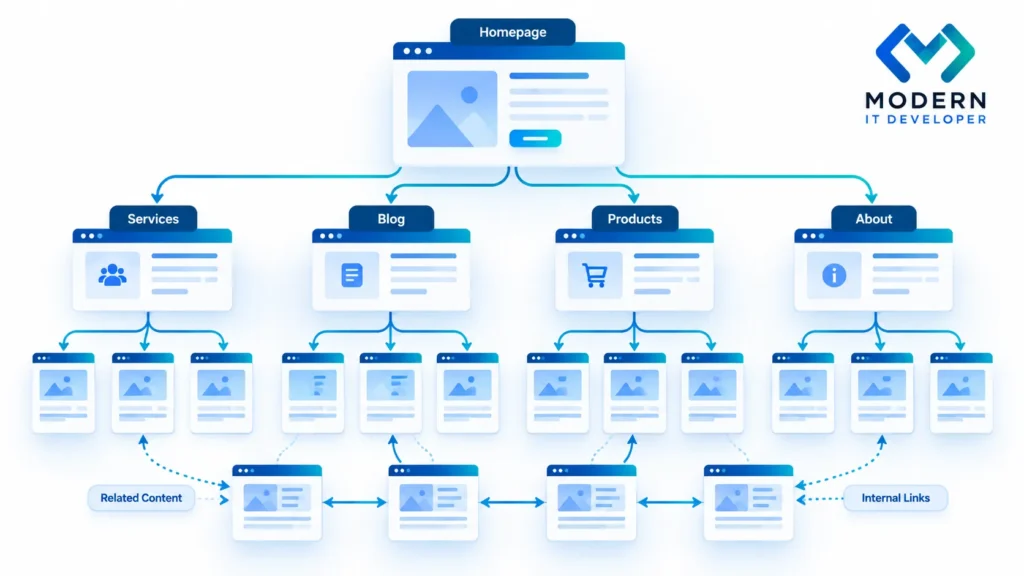
Use crawl depth, inlinks, outlinks, and visualizations to analyze navigation and internal authority flow. Important pages shouldn’t be buried deep, while low-value pages get stronger internal links.
Ask one practical question: can users and crawlers reach your most important pages through clear, contextual links? If not, improve navigation, categories, breadcrumbs, related-content modules, and contextual links from relevant authoritative pages.
Screaming Frog Free vs Paid Version
The free version can crawl up to 500 URLs, which is enough for small sites, quick checks, and learning the interface. The paid license removes that limit and adds advanced capabilities such as saved crawls, crawl configuration, JavaScript rendering, scheduling, crawl comparison, and integrations.
For a small business website, the free version may cover a basic audit. Agencies, ecommerce sites, publishers, and websites with thousands of URLs will usually benefit from the licensed version because it supports larger and more repeatable technical SEO workflows.
Turning Crawl Data Into an SEO Action Plan
A useful Screaming Frog audit should end with priorities, not just exports. Group findings by impact and effort. Critical problems may include widespread server errors, accidental noindex directives, incorrect canonicals, or navigation problems that isolate important pages.
Then address improvements such as internal linking, duplicate metadata, image optimization, structured data errors, and crawl-depth problems. Re-run the crawl after implementation and compare results. This turns Screaming Frog from a diagnostic tool into a repeatable technical SEO monitoring process.

Conclusion
Screaming Frog SEO Spider is most valuable when you use it to understand how a website behaves at scale. It uncovers technical problems that are difficult to find manually, from broken links and redirects to indexing directives, duplicate content, and internal-linking weaknesses.
The tool does not replace SEO judgment. Strong audits combine crawl data with search intent, analytics, Search Console data, and business priorities. If you want a more structured technical SEO process, explore Dune Seed’s SEO and website optimization solutions or continue with related technical SEO guides.
FAQ for Screaming Frog
What is Screaming Frog used for in SEO?
Screaming Frog SEO Spider crawls websites and collects technical information about their URLs. SEO professionals use it to identify broken links, redirects, missing metadata, indexing directives, duplicate content, canonical issues, internal-linking problems, image issues, and other technical SEO opportunities.
Is Screaming Frog free?
Yes. Screaming Frog provides a free version of SEO Spider that currently allows users to crawl up to 500 URLs. The paid licence removes the 500-URL limitation and provides additional functionality such as crawl configuration, JavaScript rendering, scheduling, saved crawls, integrations, and crawl comparisons.
How many URLs can Screaming Frog crawl?
The free version can crawl up to 500 URLs per crawl. Licensed users are not restricted by that 500-URL limit. Practical crawl size then depends on factors such as available memory, storage, hardware, website architecture, and the configuration used for the crawl.
Can Screaming Frog find broken links?
Yes. Screaming Frog can identify internal and external links that return errors such as HTTP 404 responses. It can also show the source URLs containing those links, making it easier to determine where a broken link needs to be updated, redirected, or removed.
Can Screaming Frog crawl JavaScript websites?
Yes. Screaming Frog includes JavaScript rendering capabilities in the licensed version. This allows it to execute JavaScript and inspect rendered HTML, which is particularly useful for websites built with frameworks or technologies where important content and links appear only after JavaScript executes.
Does Screaming Frog automatically fix SEO problems?
No. Screaming Frog primarily identifies, organizes, and reports technical SEO issues. It helps SEO specialists and developers understand what may require attention, but fixes normally need to be implemented in the website, CMS, server configuration, templates, content, or internal-linking structure.
Is Screaming Frog good for beginners?
Yes, but beginners should start with basic reports such as response codes, page titles, meta descriptions, H1 headings, canonicals, and internal links. Once they understand those reports, they can gradually use advanced functionality such as custom extraction, JavaScript rendering, integrations, segmentation, and crawl comparison.